

LAMP Stack kombinasi perangkat lunak yang paling populer untuk mengembangkan dan menjalankan aplikasi web di production.
LAMP merupakan singkatan dari Linux, Apache, MySQL/MariaDB, dan PHP. Dalam panduan ini, kita akan install LAMP Stack di AlmaLinux 8, sistem operasi turunan dari RHEL yang menjadi pengganti CentOS.
Update dan Upgrade Package AlmaLinux
Tingkatkan versi package almalinux dan security.
sudo dnf update -y
sudo dnf --security update -y
Web Server Apache
Install apache pada terminal almalinux dengan menjalankan perintah dibawah. Tunggu sampai proses selesai
sudo dnf install httpd -y
Aktifkan, jalankan unit systemd apache dan lihat status nya.
sudo systemctl enable --now httpd
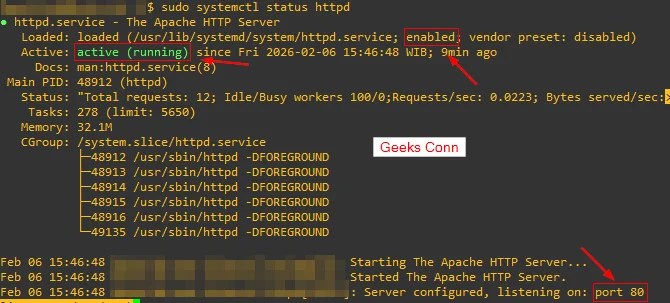
sudo systemctl status httpd
Berikut unit systemd enabled, active (running) dan secara default berjalan di port 80/ http.
Menguji Web Server Apache, akses http://IP_server di browser, pastikan muncul seperti gambar dibawah.

Database MariaDB
Database yang digunakan untuk stack lamp yaitu MariaDB.
sudo dnf install mariadb-server -y
Enable, start , dan check status database mariadb.
sudo systemctl enable --now mariadb
sudo systemctl status mariadb
Saat login ke database mariadb, username: root dan password: Blank/ Tanpa Password.
mysql -u root -p
Mengganti Password Root Default MariaDB
Sangat direkomendasikan untuk mengganti password default, karena user root memiliki hak akses full ke database mariadb.
sudo mysql_secure_installation
Output
Enter current password for root (enter for none): ENTER
Set root password? [Y/n] Y
New password: Masukan Password Root Baru
Re-enter new password: Ulangi Password Root Baru
Remove anonymous users? [Y/n] Y
Disallow root login remotely? [Y/n] Y
Remove test database and access to it? [Y/n] Y
Reload privilege tables now? [Y/n] Y
PHP
Untuk melihat version php yang dapat diinstall almalinux, bisa menjalankan perintah dibawah.
sudo dnf module list php
Berikut list version php yang bisa digunakan di almalinux yaitu 7 dan 8.

Reset module php, lalu enable php 8.2 .
dnf module reset php
dnf module enable php:8.2
Install php dan module-module yang dibutuhkan stack lamp. Tunggu sampai proses selesai
dnf install php php-common php-cli php-mbstring php-xml php-zip php-mysqlnd php-opcache php-curl php-intl php-gd -y
Check version php terinstall di almainux.
php -v
Versi php terinstall di almalinux 8, yaitu php 8.2.30 .

Check Module PHP Terinstall di almalinux
php -m
Berikut modules php 8.2.30
[PHP Modules]
bz2
calendar
Core
ctype
curl
date
dom
exif
fileinfo
filter
ftp
gd
gettext
hash
iconv
intl
json
libxml
mbstring
mysqli
mysqlnd
openssl
pcntl
pcre
PDO
pdo_mysql
pdo_sqlite
Phar
random
readline
Reflection
session
SimpleXML
sockets
SPL
sqlite3
standard
tokenizer
xml
xmlreader
xmlwriter
xsl
Zend OPcache
zip
zlib

[Zend Modules]
Zend OPcache
Configuration Firewall http dan https
Install firewalld di almalinux.
sudo dnf install firewalld -y
Aktifkan dan check status firewalld.
sudo systemctl enable --now firewalld
sudo systemctl status firewalld
Masukan protocol http dan https pada firewalld.
sudo firewall-cmd --permanent --add-service=http
sudo firewall-cmd --permanent --add-service=https
Reload firewalld untuk membaca ulang rule yang dimasukan.
sudo firewall-cmd --reload
Melihat semua rule firewalld, pastikan protocol http dan https ada.
sudo firewall-cmd --list-all
Pengujian PHP 8.2.30 AlmaLinux
Buat file info.php pada directory /var/www/html .
sudo su
touch /var/www/html/info.php
echo "<?php phpinfo(); ?>" > /var/www/html/info.php
Restart web server apache.
systemctl restart httpd
Akses file info.php pada browser untuk melihat detail php 8.2.30, http://IP_Public/info.php .

Kamu telah berhasil install LAMP Stack di AlmaLinux 8. Stack ini sekarang siap untuk menjalankan aplikasi web berbasis php atau CMS.


